
Most workspaces we’ll show in these courses have one cue list. They’re simple. Even if the cue list itself is complex, it’s just one list. However, sometimes you might find a reason to organize your work into multiple cue lists inside one work space.
For example, in this cue list I have two extra cue lists. In fact, I utilize these two cue lists in templates I use as a designer.
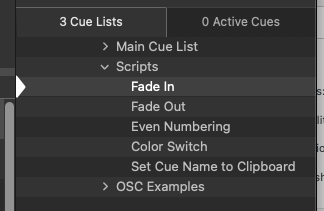
The first is a cue list of Script Cues. These are bits of Apple Script computer code that automate common tasks. If you’ve stepped through one of the Fade In or Fade Out lessons, you’ll know that this can be a tedious process when building an initial show. So I wrote some code (Script Cue) to automate that process and set each Script Cue to a hot key. Now I can select an audio cue and press Control-I to make a fade in and Control-O to make a fade out. Wow!
Side note: You don’t have to know how to code to make these. On Figure53’s website, there is a repository of useful Applescript Code that you can use for free. Simply copy and paste.
The second cue list is a cue list of example cues. These are example cues on how to do certain processes so that I don’t have to remember (or Google) every single show and so that my students have a quick resource to access the information.
The third example of Cue Lists would be various games youth event. Here I categorized everything into rounds or individual games. It was clean, organized, and because of this was straight forward enough for the club to use without my being present.
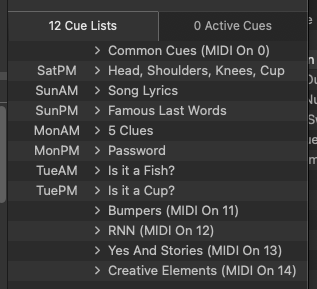
How do you get here? Press the Cue Lists panel button at the bottom right (same as the Active Cues button) and switch to the Cue Lists tab at the top of the panel.

To add a cue list, simply click on the “New List” or “New Cart” button at the bottom.

You can even open a selected list or cart in a new popup window. Cool!
Download either of these Workspaces to explore the organization.
Be careful, they both require licenses and I did not bundle any media.
Where can you find premade Applescript Code for free?
Figure53’s website.